Crafting the Perfect 3D Pop-Up Valentine Birthday Card: A Complete Guide to SVG Design 517C
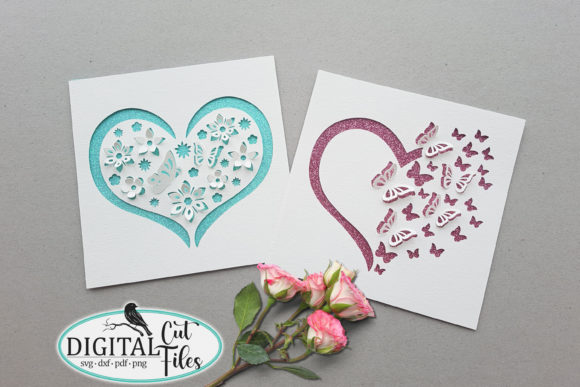
In the world of digital crafting and personalized gifting, few items carry as much emotional weight and visual impact as a handmade pop-up card. While store-bought greetings are convenient, they often lack the personal touch that defines meaningful connections. The 3D Pop Up Valentine Birthday Card SVG (Design 517C) bridges the gap between professional paper engineering and accessible home crafting. This specific design file serves as a versatile template for creating intricate heart pop-up mechanisms that delight recipients on Valentine’s Day, birthdays, or anniversaries.
Understanding how to utilize these digital cut files is essential for modern crafters. Whether you are using an automated cutting machine like a Cricut Maker or preferring the tactile tradition of hand-cutting with a craft knife, mastering this design opens up new possibilities in paper art. This guide explores the technical specifications, material requirements, and assembly processes necessary to bring Design 517C to life, ensuring your finished project is both structurally sound and aesthetically beautiful.
Understanding Digital Cut Files: SVG, DXF, and PDF Formats
To successfully create a 3D pop-up card, one must first understand the digital assets involved. The 517C design package is not merely a picture; it is a set of precise vector instructions. These files are typically delivered in a compressed ZIP folder, which must be unzipped before use. Inside, you will find three distinct file formats, each serving a unique purpose in the crafting ecosystem.
The Role of Vector Graphics in Paper Engineering
The SVG (Scalable Vector Graphics) file is the gold standard for users of Cricut Design Space and Silhouette Studio Designer Edition. Unlike raster images (like JPEGs) that pixelate when resized, SVGs use mathematical paths. This means the blade path remains crisp regardless of scale. For a pop-up card, precision is non-negotiable; a fraction of a millimeter difference can prevent the card from closing flat. The SVG format ensures that score lines and cut lines remain perfectly aligned.
For users of older software or specific machines like the Silhouette Cameo (basic edition), the DXF (Drawing Exchange Format) is included. DXF is a universal CAD data file format that allows for interoperability between different design programs. While sometimes less layered than SVGs, DXFs provide the essential cut paths needed for machine execution.
Finally, the PDF format serves a dual purpose. It acts as a printable template for those without electronic cutting machines and serves as a reference document for assembly. Understanding the distinction between these files prevents common frustrations, such as trying to upload a PDF to a machine expecting vectors or attempting to cut a raster image that lacks defined paths.
Machine Cutting vs. Manual Crafting: Choosing Your Method
One of the most significant advantages of the 517C Heart Pop-Up Card design is its adaptability. It respects both the technological capabilities of modern makers and the traditional skills of manual artisans.
Optimizing for Electronic Cutting Machines
This design has been rigorously tested with the Cricut Explore Air, ensuring compatibility across the Cricut ecosystem, including the Cricut Maker. It is also fully functional with Silhouette Studio machines and Brother ScanNCut devices. When setting up your machine, pay close attention to the blade basis. Pop-up cards require two distinct actions: cutting through the paper and scoring fold lines.
- Cutting: Use a fine-point blade for standard cardstock. Ensure your mat is sticky enough to hold the paper firm during intricate internal cuts.
- Scoring: If your machine supports it (e.g., Cricut Maker with Scoring Wheel), use the dedicated scoring tool for crisp folds. For Explore Air users, a scoring stylus or a "kiss cut" method on low pressure may be required depending on paper thickness.
- Sizing: In its folded mode, this card measures approximately 5.5 inches. Always verify dimensions in your software before cutting to ensure it fits standard envelopes.
The Art of Hand Cutting with PDF Templates
Technology should never be a barrier to creativity. For those who prefer manual methods or lack access to a die-cutting machine, the included PDF outlines are invaluable. Print the PDF directly onto your chosen cardstock. Using a sharp craft knife and a metal ruler, carefully trace the solid lines for cuts and dashed lines for scores.
Manual cutting offers a meditative aspect to crafting that machines cannot replicate. However, it requires patience. A self-healing cutting mat is essential to protect your work surface and maintain blade sharpness. While more time-consuming, hand-cutting allows for real-time adjustments and a deeper connection to the structural mechanics of the pop-up.
Material Selection and Assembly Essentials
The success of a 3D pop-up card relies heavily on material physics. Paper weight, adhesive choice, and color contrast are not just aesthetic decisions; they are structural ones.
Selecting the Right Cardstock
Standard printer paper is too flimsy for pop-up mechanisms; it will sag and fail to stand upright. Conversely, cardboard is too thick to fold cleanly without cracking. You need standard cardstock, typically ranging from 65lb to 80lb (176gsm to 216gsm). The design requires two different colors to differentiate the pop-up mechanism from the card base, enhancing the 3D visual effect.
An optional but highly recommended addition is glitter cardstock for the backward cover. This adds a premium finish and hides any adhesive marks from the internal mechanism. Note that glitter paper can be abrasive; if machine cutting, check your blade frequently for dullness.
Adhesives and Tools
Assembly requires precision bonding. Liquid glues can cause warping due to moisture content. Therefore, the recommended adhesives are:
- Craft White Glue: Use sparingly with a precision tip applicator. Allow adequate drying time under weight.
- Double-Sided Tape (Scotch 0.25): Ideal for instant bonds without warping. The 0.25-inch width is perfect for narrow tabs found in pop-up engineering.
Navigating Instructions and Personalization
A digital download is only as good as the documentation accompanying it. The 517C package includes comprehensive guides to ensure user success, addressing the "Experience" and "Expertise" aspects of helpful content creation.
Assembly and Customization Guides
The included "How to assemble the card" PDF provides step-by-step visual instructions. Pop-up cards involve spatial reasoning that text alone cannot convey; following these diagrams prevents structural failure. Additionally, the "How to add the design into the shape" guide is crucial for personalization. This document teaches you how to modify the base SVG/DXF to include custom names, dates, or messages within the cut file itself, rather than applying them as stickers later. This integration creates a cohesive, professional-looking final product.
The "How to score and cut" JPG file serves as a quick-reference cheat sheet for machine settings, reducing trial and error. These resources transform a simple file download into an educational experience, helping beginners build confidence while offering experienced crafters efficiency.
Important Technical Considerations and Best Practices
Before beginning your project, there are several logistical details to remember to ensure a smooth workflow.
- Unzip First: Your downloaded files are compressed. You must unzip the folder before accessing SVGs or PDFs. Cutting software cannot read inside a zipped archive.
- No Watermarks: The files provided are clean production files. Backgrounds seen in online listing photos are for display purposes only and are not included in the cut file.
- Font Licensing: Be aware that the monogram font shown in promotional images is not included. You must use your own licensed fonts for personalization. This respects intellectual property rights and ensures you have the legal right to use typography in your projects.
- Test Cuts: Always perform a test cut on scrap paper of the same weight. Blade depth and pressure settings vary by machine age and material batch.
The Broader Significance of DIY Paper Engineering
Creating a 3D Pop-Up Valentine Birthday Card using design 517C is more than a craft project; it is an exercise in mindful creation. In an era of instant digital communication, a physical object that requires engineering, assembly, and tactile interaction holds profound significance. It demonstrates effort, foresight, and care.
From an educational perspective, working with these files introduces concepts of geometry, structural integrity, and digital literacy. For small business owners, mastering such designs allows for the creation of unique, high-margin products that stand out in saturated markets. For hobbyists, it provides a satisfying intersection of technology and tradition.
By understanding the nuances of file formats, material properties, and assembly techniques, you move beyond simply "making a card" to mastering a form of artistic expression. Whether you are cutting with a Cricut Maker or a craft knife, the result is a tangible testament to the enduring power of handmade sentiment. Take your time, follow the included guides, and enjoy the process of bringing flat paper to life.